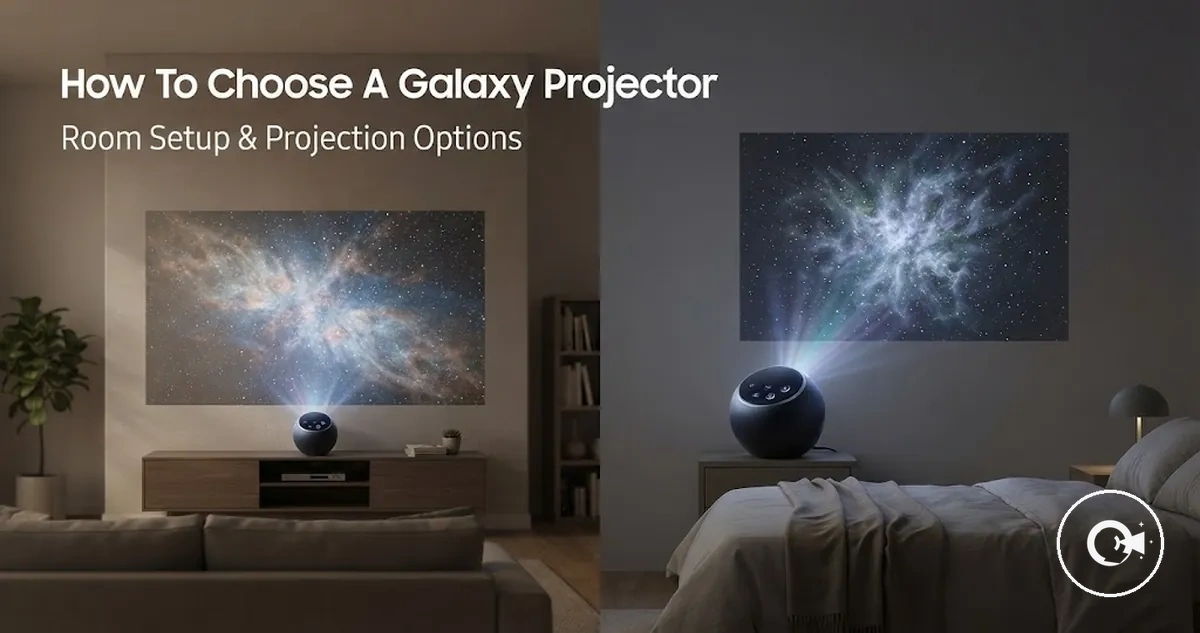
Choosing a Galaxy Projector for the Right Room and Use Case
Choosing a galaxy projector depends on how well its projection quality, features, and controls match the intended room size and use case. Brightness, placement, coverage, and value can vary by model and room conditions, so room fit and use-case fit should be the first filters.
A bedroom may benefit from adjustable brightness, a timer, and simple controls that support lower-light ambience. Decorative use may place more weight on colour range and nebula effects, while party use may favour stronger visible effects, motion, or convenient mode switching. A star projector suited to one setting may feel less practical in another, which makes one-size-fits-all selection unreliable.
Product lists can identify common features, but they do not replace criteria-based evaluation. Convert claims about colours, modes, remote or app controls, and projection effects into questions about placement, room conditions, daily use, and buyer priority. This approach prepares the reader to evaluate compatibility first and feature usefulness second.
Decision frame: More features do not automatically create more value. A galaxy projector offers better practical value when its brightness, controls, timer, nebula effects, and projection quality support the intended room and use case without adding unnecessary complexity.
Galaxy Projector Fit Starts with Room Size and Placement
A galaxy projector fits a room when its projection distance, available surface area, and room darkness support the intended viewing effect. Coverage can vary with the model, lens angle, brightness, and placement conditions, making placement the first compatibility checkpoint before comparing other features.
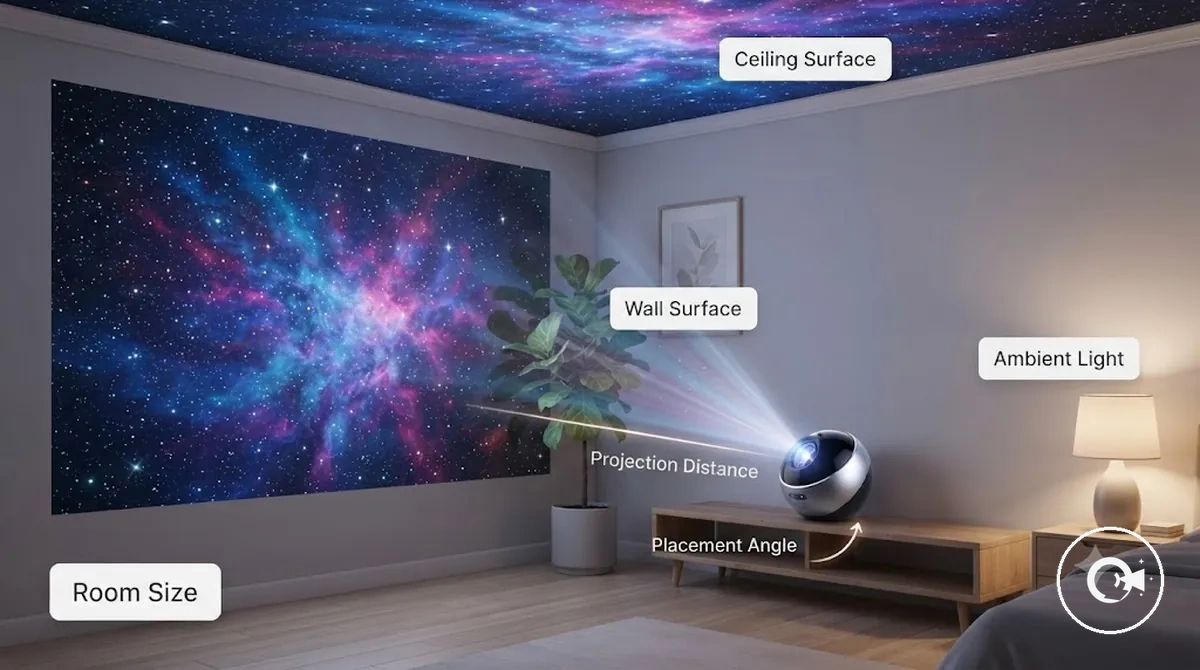
A small bedroom may achieve a different projection spread than a standard bedroom or a larger relaxation space using the same galaxy projector. The viewing result can also change with the ceiling or wall surface, placement angle, and ambient light. Room conditions influence both coverage and visibility, even when the projector itself remains the same. Placement affects selection here, while detailed setup guidance belongs in the broader Galaxy Projectors category.
The following checklist helps verify whether a galaxy projector is compatible with the intended room before advanced features become the deciding factor. Galaxy Projector Fit Starts with Room Size and Placement because these conditions shape the viewing experience. Verify these conditions before comparing advanced features.
- Room size: Check whether the intended room provides suitable space for the desired projection spread.
- Projection distance: Confirm that the available placement allows the projector to reach the viewing surface appropriately.
- Wall or ceiling surface: Consider the size, colour, and visibility of the projection surface.
- Placement angle: Ensure the projector can face the wall or ceiling without an awkward viewing angle.
- Ambient light: Remember that brighter surroundings can reduce projection visibility and perceived coverage.
- Furniture obstruction: Check whether shelves, beds, or other objects may interrupt the projection path.
- Intended use: Match room placement to the planned bedroom ambience, relaxation, or decorative use.
Bedroom coverage and projection distance
Bedroom coverage depends on projection distance, surface area, and the available brightness for the room. As projection distance changes, the visible projection spread and viewing effect can change, while room darkness and the projection surface influence the final result. Model design can produce different coverage under similar placement conditions.
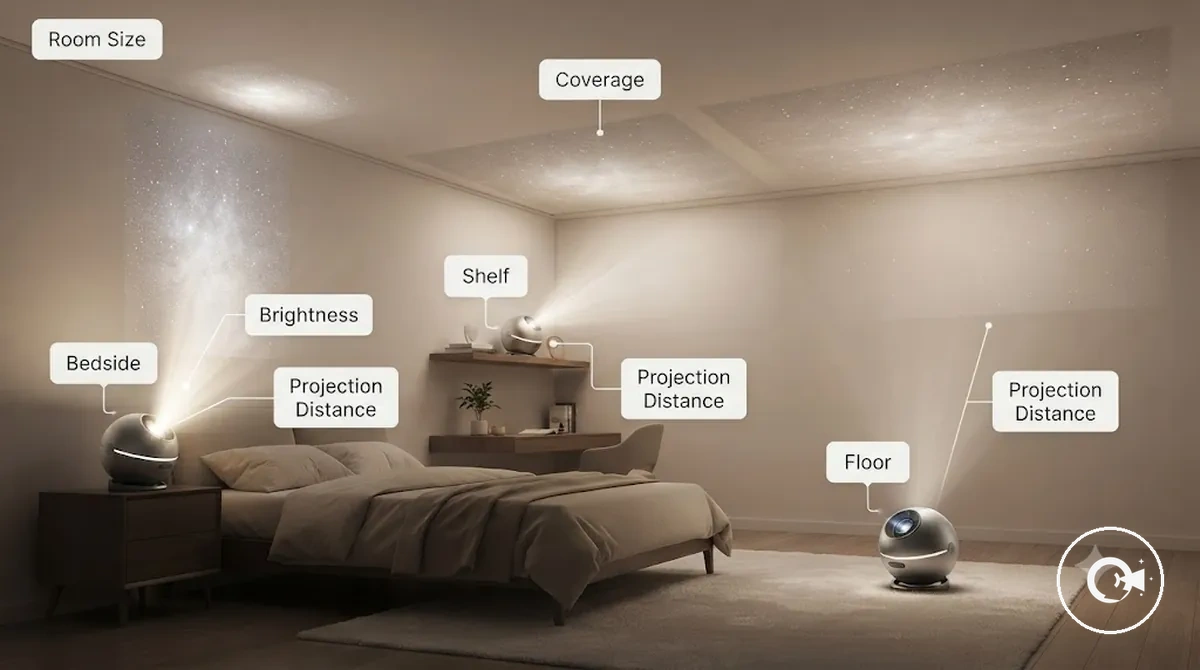
Bedroom coverage and projection distance become easier to judge when comparing common placement positions. Bedside placement may suit a compact room, while shelf placement can change the projection angle and increase the usable surface area. Floor placement may create a different viewing effect when room size, brightness, and surface conditions allow. The following examples organise common placement conditions.
- Bedside placement: A shorter projection distance may create a concentrated projection spread on a nearby ceiling or wall.
- Shelf placement: A higher position can change the projection angle and may improve visible coverage when the viewing surface is suitable.
- Floor placement: A longer projection distance can alter the viewing effect, depending on room size, surface area, brightness, and room darkness.
- Small room: Limited surface area may make the projected image feel more immersive with careful placement.
- Medium room: Greater room size may require more attention to placement and projection distance to balance coverage and brightness.
Wall, ceiling, and angle limitations
Projection limits often come from wall, ceiling, and angle conditions rather than from weak projector features. Even a galaxy projector with strong features can produce reduced visible projection when the viewing surface, projector tilt, or projection angle does not suit the room. The main compatibility constraints are surface colour, ceiling height, furniture obstruction, projector tilt, and angle adjustment.
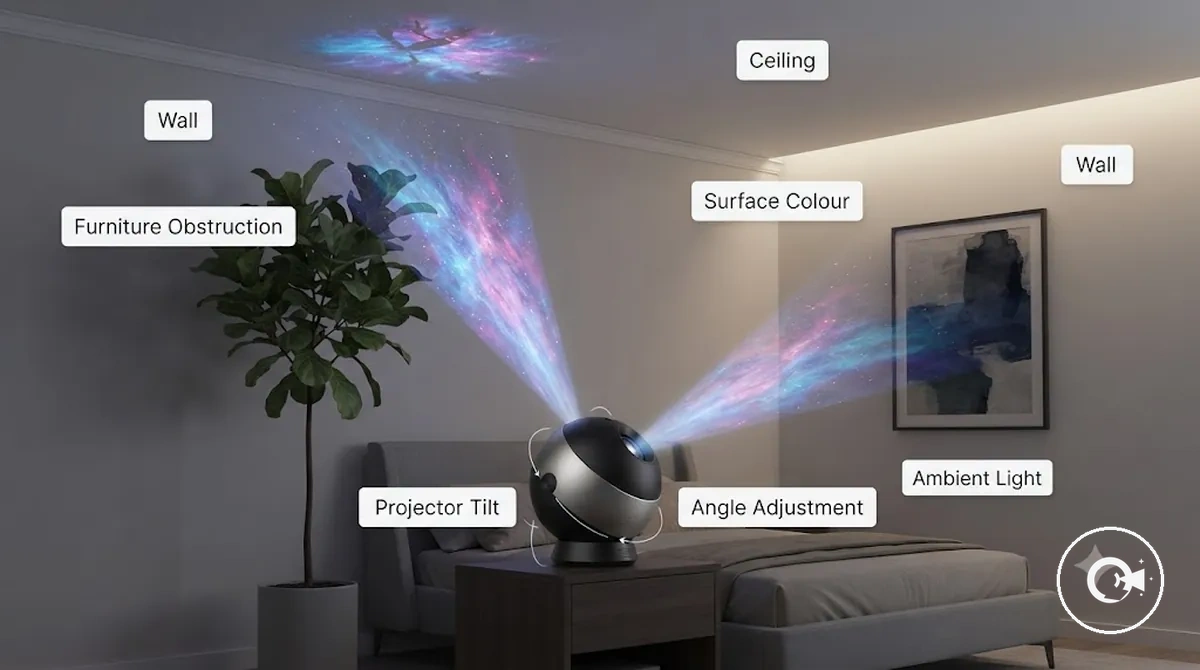
A room with a dark ceiling but a bright wall may show different projection visibility depending on the selected viewing surface and projection angle. Furniture obstruction or limited angle adjustment can also reduce the visible projection boundary, even when the projector offers strong features. This remains a selection check, while detailed placement optimisation belongs outside this selection-focused section.
Wall, ceiling, and angle limitations can be reviewed with the following checklist to verify whether room conditions may restrict visible projection.
- Surface colour: Check whether the wall or ceiling surface may reduce projection visibility.
- Ceiling height: Consider whether ceiling height suits the intended viewing surface.
- Furniture obstruction: Identify objects that may interrupt the projection path.
- Projector tilt and angle adjustment: Confirm that the available adjustment range suits the room layout without assuming every angle produces the same result.
- Ambient light: Consider how surrounding light may further reduce visibility under the selected surface and angle conditions.
Projection Quality Signals That Matter Most
Projection quality should be judged by visible output rather than marketing claims. Brightness, clarity, colour range, star sharpness, nebula depth, motion smoothness, and room darkness have a greater influence on the viewing experience than long feature lists alone. These observable signals are the core criteria for evaluating projection quality.
Large colour counts or extensive feature lists do not automatically produce a better viewing experience. A projector may advertise many effects while offering only limited visible improvement in brightness, clarity, or star sharpness. Observable improvements are more useful than impressive-sounding specifications, although the final result still depends on room darkness, the viewing surface, projection distance, and model design.
Projection Quality Signals That Matter Most become easier to compare when each observable attribute is linked to its visible effect. The image below highlights these quality signals, while Galaxy Projector features provide a deeper explanation of individual functions beyond this attribute-focused evaluation.
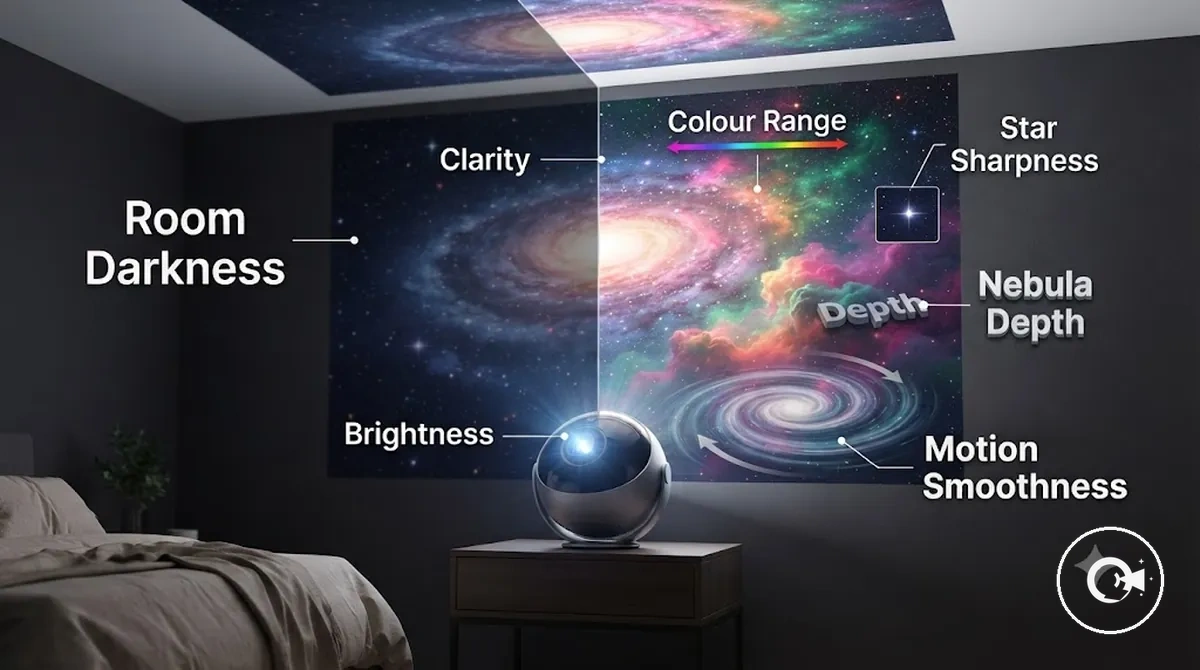
Projection Quality Signals That Matter Most can be organised by observable attributes so that selection decisions are based on visible effects rather than marketing language.
| Entity/Part | Attribute/Criterion | Value/Condition | Effect/Decision |
|---|---|---|---|
| Projection | Brightness | Suitable for room darkness | Can improve visible output when lighting conditions are favourable |
| Projection | Clarity | Clear image definition | Helps fine details remain visible |
| Nebula effect | Colour range | Balanced colour variation | Can create a richer viewing effect |
| Star effect | Star sharpness | Well-defined points of light | Produces clearer star patterns |
| Nebula effect | Nebula depth | Layered visual appearance | Can add perceived depth to the projection |
| Motion | Motion smoothness | Consistent movement | Supports a more natural ambience |
| Room | Room darkness | Lower ambient light | Can improve perceived projection quality |
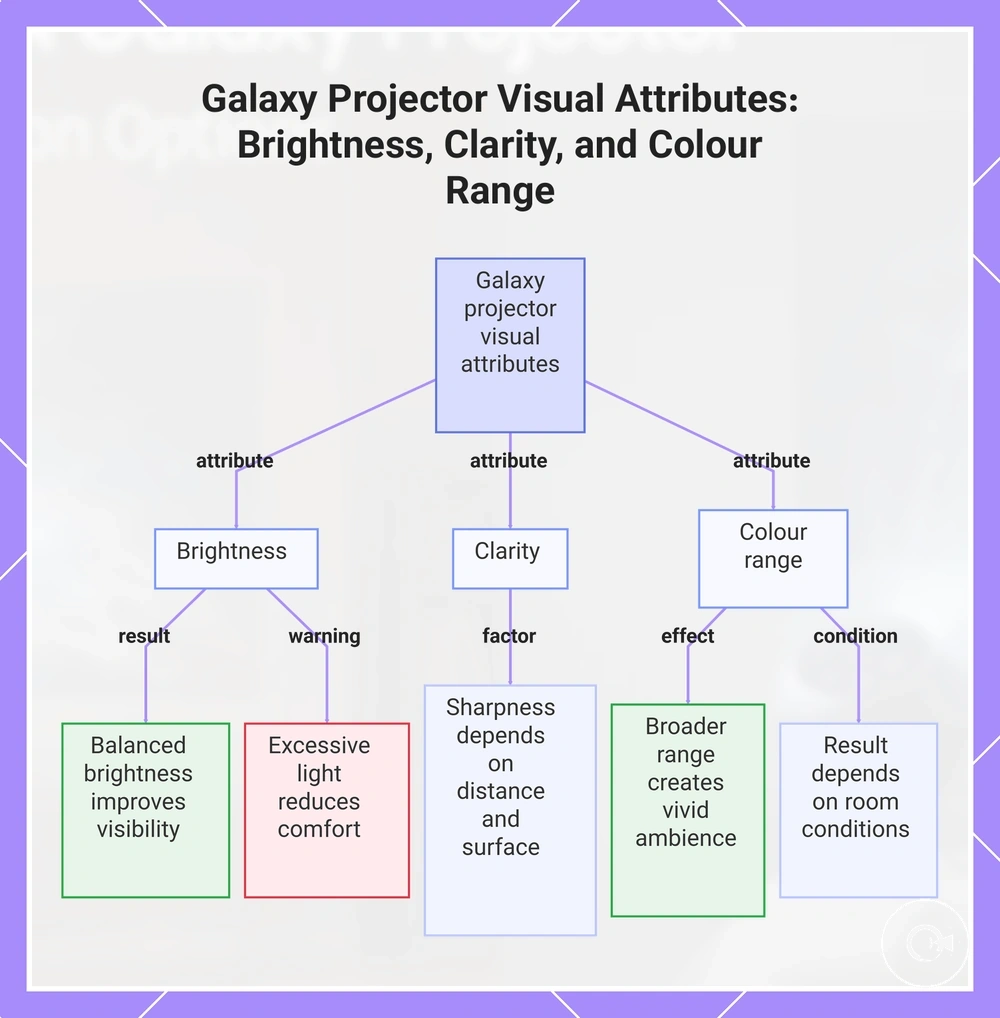
Brightness, clarity, and colour range
Brightness, clarity, and colour range determine whether a galaxy projector appears soft, vivid, or washed out under different viewing conditions. Brightness affects visible light output, clarity influences how well projected details remain defined, and colour range shapes the overall ambience. The final viewing effect still depends on room darkness, projection distance, and surface colour, particularly in a dark room.
Higher brightness or more colour options are not automatically better for every use case. Strong light output may feel less comfortable for sleep use, even if it creates a more vivid effect in other settings. The following points show how each attribute changes the viewing result and can help guide a balanced selection.
- Brightness: In a dark room, balanced brightness can improve visibility, while excessive light output may reduce comfort for sleep use.
- Clarity: Projection distance and surface colour can influence whether projected stars and nebula effects appear sharp or washed out.
- Colour range: A broader colour range can create a more vivid ambience, although the visible result still depends on room conditions and projector design.
This chart shows how each visual attribute influences the viewing experience of a galaxy projector, including trade-offs and dependencies on room conditions.
Stars, nebula effects, motion, and realism
Stars, nebula effects, motion, and realism shape the atmosphere of a galaxy projector rather than its core room fit. Static stars, moving nebula effects, colour blending, and rotation smoothness can make the decorative effect feel calm, vivid, or immersive. Effect type is therefore a useful preference filter when comparing viewing styles.
Galaxy projector effects are designed to create ambience rather than scientifically accurate views of the night sky. Decorative realism may strengthen the visual impression, but it should not be treated as astronomical accuracy. The contrast below helps distinguish ambience-focused effects from visually detailed effects so the selection can match the intended preference.
| Effect focus | Best selection use |
|---|---|
| Soft stars, gentle nebula patterns, and smooth rotation | May suit users who prefer calm ambience and a subtle decorative effect. |
| Layered stars, richer colour blending, and more noticeable motion | May suit users who prefer stronger visual detail and a more dynamic atmosphere. |
Control and Convenience Features for Daily Use
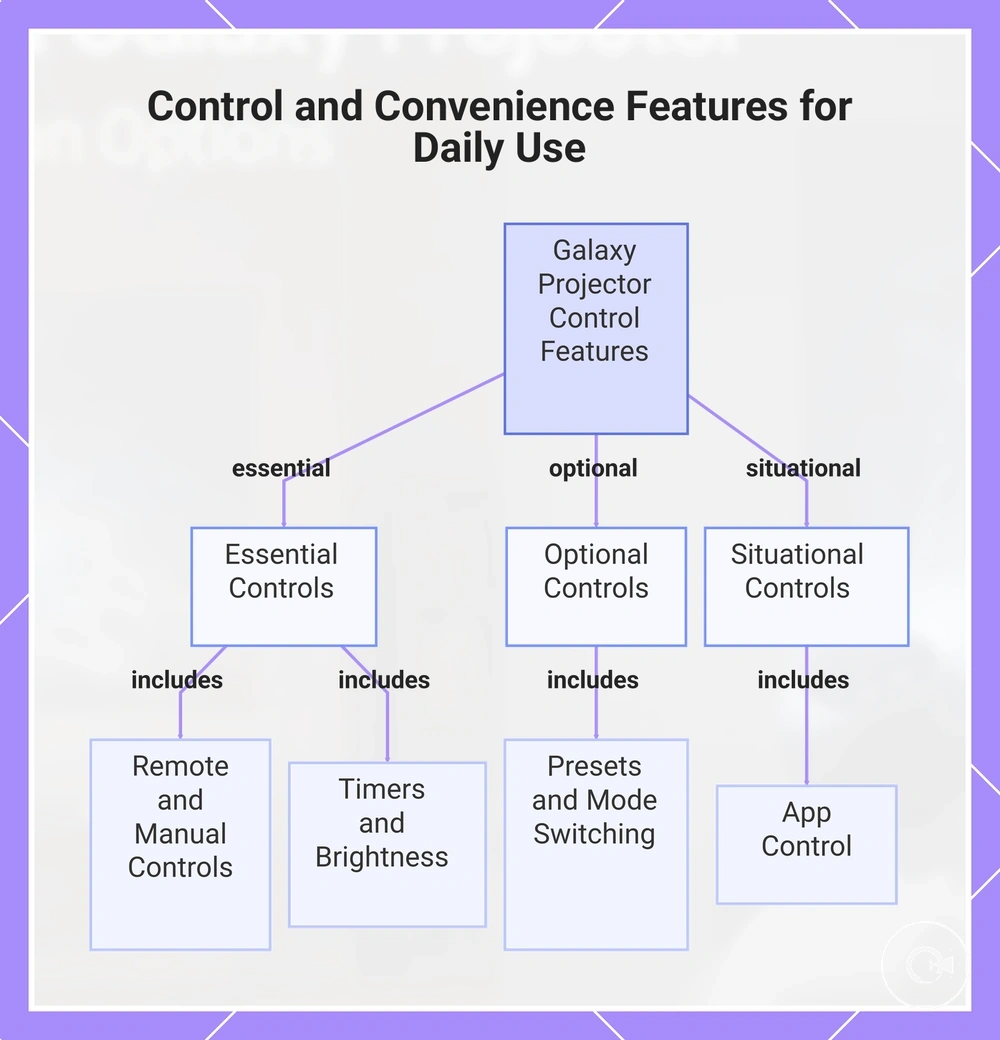
Control features matter most when they reduce repeated adjustment during daily use. A galaxy projector with practical control access can make brightness adjustment, mode switching, and timers easier to use without interrupting the viewing experience. Control access is therefore the main decision frame when comparing convenience features.
For nightly use, timers, brightness adjustment, and sleep-friendly operation often provide the greatest convenience because they are used repeatedly. For occasional ambience use, presets and mode switching may be enough to change light modes quickly. For party use, remote control or app control may become a higher priority, although app features depend on device support and user setup.
Control and Convenience Features for Daily Use become easier to compare when each feature is judged by how often it reduces daily-use friction rather than by the length of a feature list. The checklist below separates essential, optional, and situational controls to support practical selection.
- Remote control — Essential: Makes frequent adjustments easier without needing direct access to the projector.
- Timers — Essential: Automatic shutoff can support sleep-friendly operation when a timer function is available.
- Brightness adjustment — Essential: Helps adapt the viewing effect to changing room conditions and user preferences.
- App control — Situational: May add convenience when supported by the projector, compatible devices, and the chosen app.
- Presets and mode switching — Optional: Useful for changing ambience quickly without repeated manual adjustments.
- Manual buttons — Essential: Provide reliable user control when a remote control or app control is unavailable.
This chart categorizes galaxy projector control features into essential, optional, and situational groups to help compare convenience based on daily use scenarios.
Remote, app, voice, and manual controls
The most suitable control method depends on how often the galaxy projector is adjusted, where it is placed, and the user preference for access. A remote, app, voice control, or manual controls can each reduce different forms of adjustment friction. App and voice features remain conditional on device support, setup, and voice-control compatibility.
For occasional adjustments, a remote or manual button access may provide straightforward control without extra setup. For nightly repeated use, a remote or app can make frequent changes more convenient, while voice control may help when compatible support is available. Manual controls remain a useful backup when other methods are unavailable. The comparison below separates occasional adjustment from repeated use.
The following comparison shows how each control method changes everyday usability.
| Control method | What it changes | Best use condition | Risk or limitation |
|---|---|---|---|
| Remote | Allows adjustment from a distance within the available remote range. | Useful when changing settings from a bed or seating area. | Remote range and battery condition can affect convenience. |
| App | Adds control through a compatible phone or tablet. | Suitable when app support and setup are available. | App dependency may require device compatibility and configuration. |
| Voice | Provides spoken control when supported. | May suit compatible smart-home or voice-control setups. | Voice-control compatibility depends on supported devices and services. |
| Manual controls | Provides direct physical control on the projector. | Useful as a backup or for simple adjustments. | Requires direct access to the projector. |
Timers, lighting modes, and brightness adjustment
A timer, lighting modes, and brightness adjustment matter most when they reduce repeat-use effort or improve comfort for the intended setting. A timer can support automatic shutoff when available, while brightness adjustment and lighting modes can make mood setting faster and more flexible. Their value should be judged by the planned use case.
For sleep, lower brightness and a timer may make bedroom use more convenient without implying a health benefit. For ambience, lighting modes or presets can simplify mood setting, while decorative use may benefit from quick access to different effects. Mode quality and usability matter more than feature count.
The following points connect each control feature to a use condition and likely outcome.
- Timer: Useful for bedroom or sleep use when automatic shutoff reduces the need for manual control later.
- Lighting modes: Helpful for ambience or decorative use when faster mood setting is a priority.
- Brightness adjustment: Supports lower brightness when a softer viewing effect or greater comfort is preferred.
Matching Galaxy Projector Features to Buyer Priorities
Buyer priorities should determine which feature groups deserve the most attention, rather than treating every feature as equally important. The value of a timer, sound, smart controls, portability, or projection effect quality can change with room conditions, use frequency, and the intended atmosphere. Match feature groups to the primary use case before comparing feature lists.
A buyer focused on sleep may value a timer and brightness adjustment more than extra effects. Someone creating ambience or decoration may place greater emphasis on colour, motion, and projection effect quality, while party use may give more value to brightness or sound when available. These different priorities can justify different feature groups, so the matrix below supports criteria-based selection instead of a single overall choice.
Use the matrix to identify the feature groups that support the intended use without adding functions that may see little use. Prioritising feature fit over feature count can simplify selection and reduce unnecessary trade-offs, although the final decision still depends on personal preference and room conditions.
| Buyer priority | Features to prioritize | Features to treat as optional | Decision risk |
|---|---|---|---|
| Sleep | Timer, brightness adjustment, comfort-focused controls | Sound, advanced effects | Choosing strong visual features over bedroom comfort |
| Ambience | Colour range, motion, nebula effects, projection effect quality | Sound, portability | Focusing on feature count instead of visual quality |
| Decoration | Projection effect quality, lighting modes, colour presentation | Smart controls, sound | Adding features that provide little decorative value |
| Party use | Brightness, sound, dynamic lighting effects | Sleep-focused timer features | Selecting features that do not match the intended atmosphere |
| Portable use | Portability, convenient controls, easy room movement | Extensive lighting modes | Reducing convenience by prioritising rarely used features |
Sleep, ambience, decoration, and party use
Sleep, ambience, decoration, and party use create different selection contexts for a galaxy projector. Sleep may place more value on brightness control and a timer, while ambience, decoration, and party use can shift attention toward colour range, motion intensity, sound, or room coverage. The local purpose is to match feature fit to the intended use.
The same projection effect can be useful in one context and distracting in another. A wide colour range and stronger motion intensity may suit ambience, decoration, or party use, while lower brightness and gentler movement may feel more comfortable for sleep. A bright moving effect can support a party atmosphere but may reduce sleep comfort.
The following points map each use case to the feature priorities most likely to affect the viewing experience.
- Sleep: Prioritise brightness control, lower motion intensity, and a timer when reduced adjustment and softer output are preferred.
- Ambience: Consider colour range, nebula effects, and moderate motion when the goal is a flexible background atmosphere.
- Decoration: Focus on room coverage and visual effect quality when the projector is mainly used as decorative lighting.
- Party use: Sound, stronger brightness, and more active motion intensity may be useful when creating a livelier room effect.
Smart features, sound, and extra effects
Smart features, sound, and extra effects are most useful when they reduce friction or improve the intended use. App control, voice control, Bluetooth, presets, or a speaker should be judged by practical value rather than feature count. Compare these extras by how often they support everyday use.
More smart or sound features do not automatically create a better experience. App control, voice control, Bluetooth behaviour, speaker functions, or white noise support may introduce a dependency risk because their usefulness depends on the model, compatible devices, and user setup. For low-friction bedroom use, a simpler projector with straightforward controls may be more suitable when extra features are unlikely to be used; the comparison below highlights the main trade-offs.
| Extra feature | Practical value | Dependency or risk | When to prioritize |
|---|---|---|---|
| App control | May simplify repeated adjustments | Depends on compatible devices and setup | When phone-based control is likely to be used often |
| Voice control | Can provide spoken control when supported | Voice-control compatibility varies by model and setup | When compatible voice control would reduce adjustment friction |
| Speaker or white noise | May combine lighting and sound in one device | Sound quality and support vary by model | For bedroom or ambience use when audio is useful |
| Bluetooth | May support wireless audio or control functions | Bluetooth behaviour depends on device compatibility and setup | When supported wireless functions have practical value |
| Presets and extra effects | Can make effect changes faster | Extra effects may add little value if rarely used | When projection styles are changed regularly |
Galaxy Projector Value Depends on Feature Quality, Not Feature Count
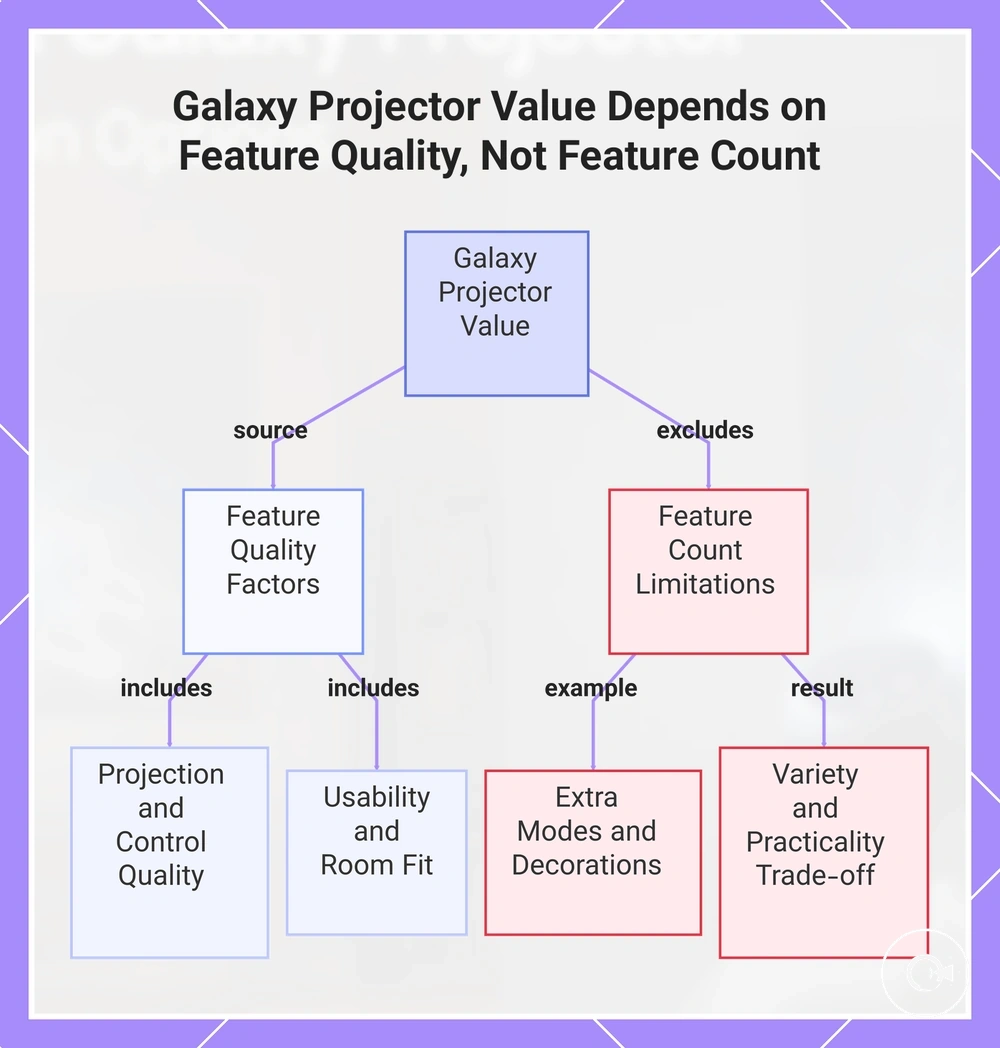
Value comes from useful feature quality rather than feature count. Projection quality, control reliability, timer usefulness, and suitable build expectations can contribute more to everyday usability than a long list of extra modes. Use usability and room fit as the main filters.
Many colours, modes, or decorative extras can still provide low practical value when they do not improve the intended use. Features worth paying for are those that support projection quality, repeat use, and room suitability. Decorative extras may matter less when they add complexity without a useful outcome, creating trade-offs between variety and practical value.
Compare feature quality, usability, room fit, control reliability, timer usefulness, and build expectations against the intended use before judging overall value. When these factors align with buyer priorities, the decision can be made with greater confidence, although value still depends on individual needs and feature trade-offs.
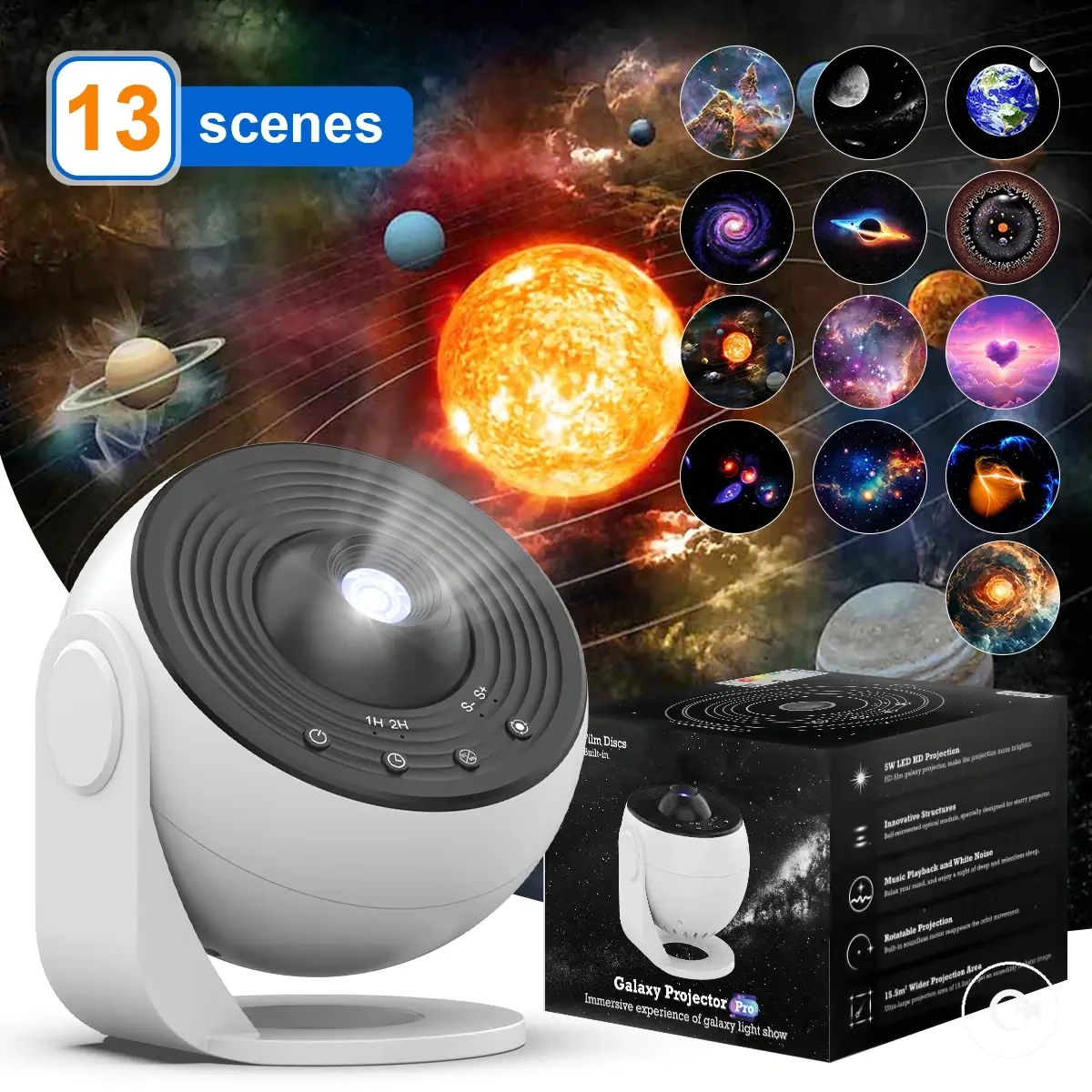
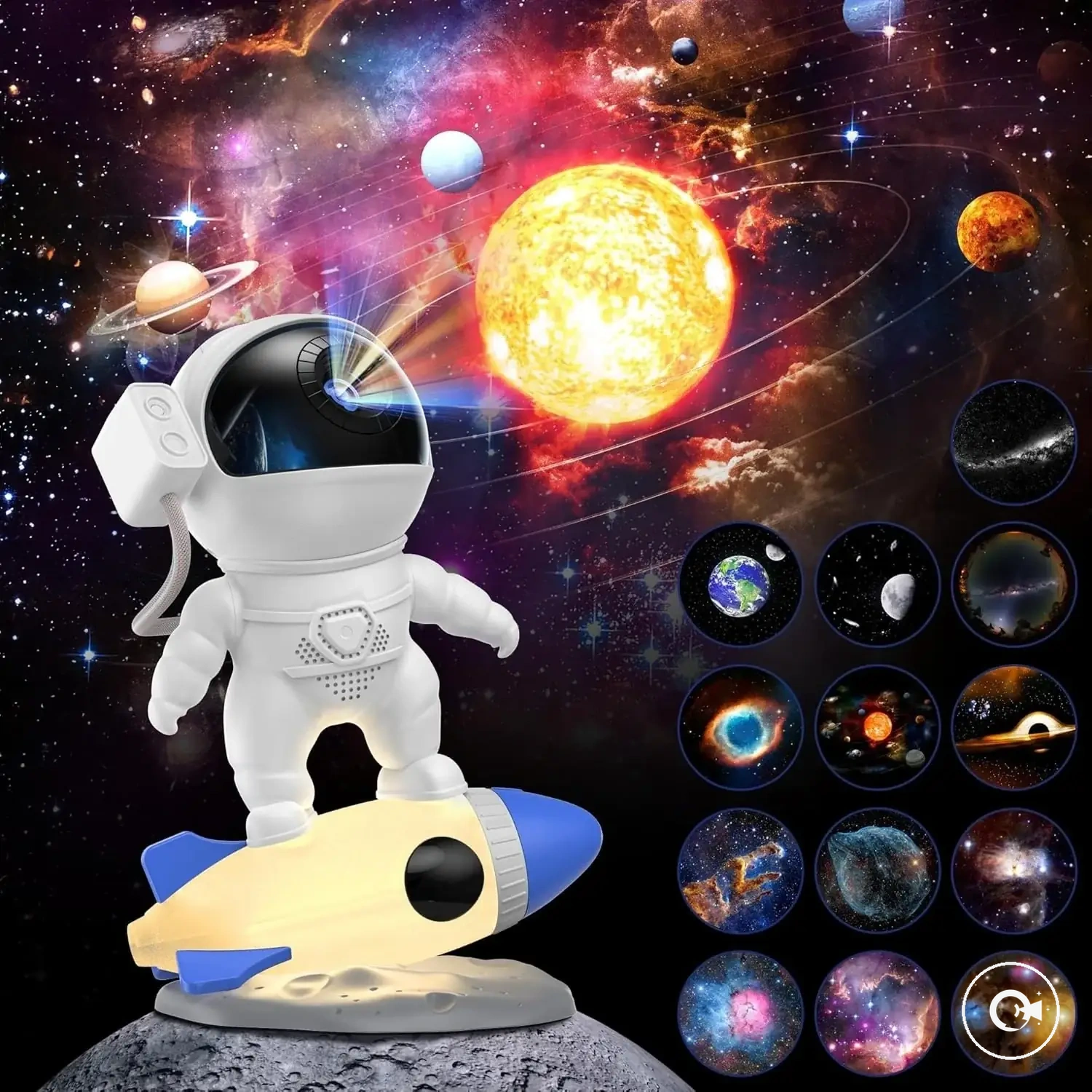
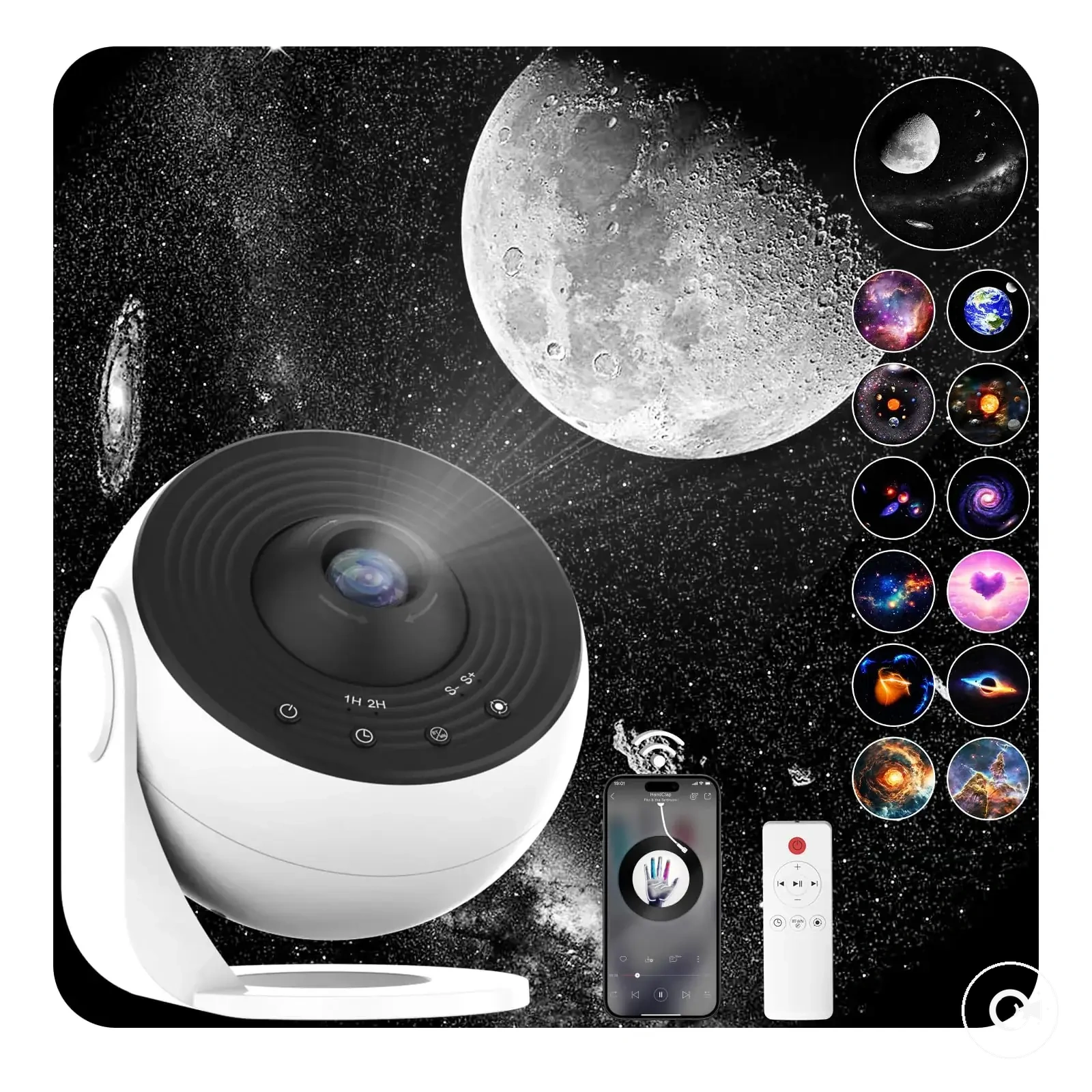
The products below are useful examples for comparing available options. Before buying, check that the compatibility criteria, key features, and product details match your needs.
This chart shows how galaxy projector value is determined by feature quality rather than feature count, highlighting key quality factors and common pitfalls that reduce practical value.
Common Selection Mistakes with Galaxy Projectors
Most selection mistakes happen when the wrong feature is matched to the wrong room condition or use case. Product claims can sound suitable while projection distance, room fit, brightness expectations, or control needs point in a different direction. The safer correction is to compare each claimed benefit with the condition required for it to be useful.
A weak result does not always mean the projector itself is unsuitable. A capable model may still appear dim, limited, or inconvenient when used at an unsuitable projection distance, in the wrong room condition, or without the controls needed for daily use. This distinction prepares the mistake-to-correction list below.
Use the correction list to identify the source of each decision risk before comparing more features. Common Selection Mistakes with Galaxy Projectors are easier to avoid when each mismatch is paired with a safer decision.
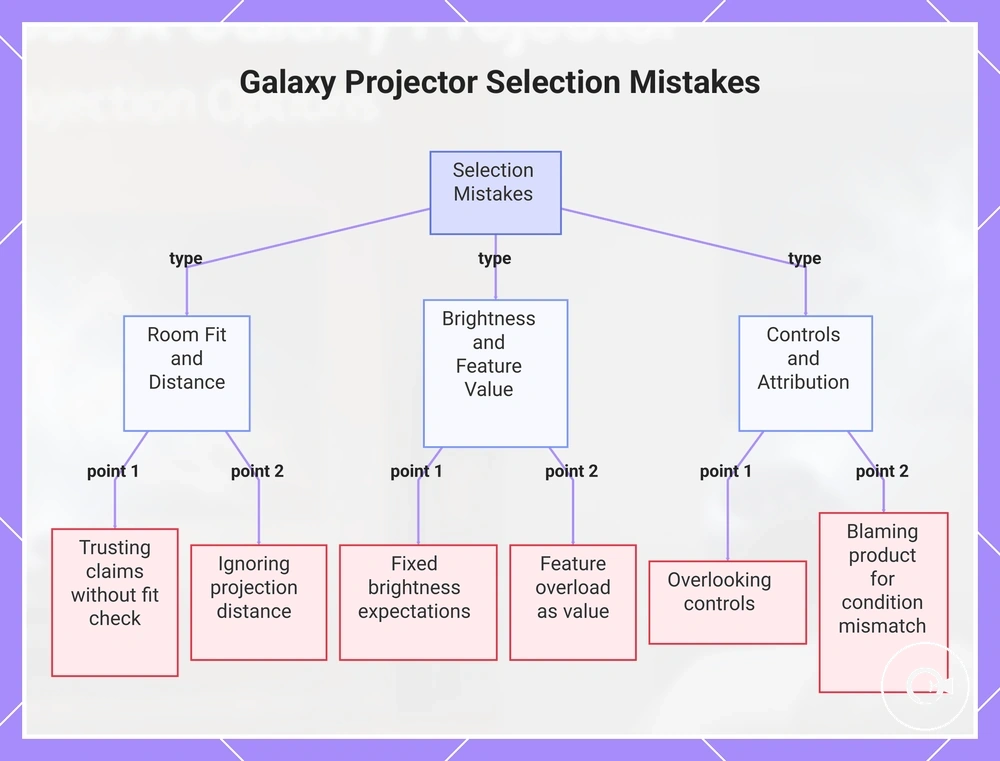
- Mistake: Trusting product claims without checking room fit. Compare the claimed effect with the intended room size, surface, and use case before treating it as relevant.
- Mistake: Ignoring projection distance. Check whether the available placement supports the expected coverage and visible output before judging the projector.
- Mistake: Setting fixed brightness expectations. Qualify brightness by room darkness, surface colour, distance, and intended atmosphere rather than assuming stronger output is always preferable.
- Mistake: Treating feature overload as higher value. Separate frequently used controls and effects from extras that may add complexity without changing the practical outcome.
- Mistake: Overlooking controls. Check whether timers, manual access, remote control, or brightness adjustment suit daily use before prioritising decorative effects.
- Mistake: Blaming the product for a condition mismatch. Distinguish a genuinely weak product from a suitable product used in an unsuitable room condition before making a final decision.
This chart categorizes six common selection mistakes for galaxy projectors into three groups, helping readers identify and avoid each error.
Choosing by product claims instead of room fit
Product claims are useful only after they are checked against room fit and the intended use case. Brightness claims, coverage claims, effect names, and smart features may describe a capability without showing whether the room conditions support it. The practical rule is to compare each claim with the condition required for that claim to matter.
A projector may present a strong coverage claim but still produce a limited result when projection distance, surface area, angle, or room darkness does not suit the setup. In that case, the mismatch comes from the room condition rather than proving that the claim is false. The checks below connect each product claim to the condition that should be verified.
- Brightness claim: Verify room darkness, projection distance, and surface colour; a strong brightness claim may still appear weak in an unsuitable room.
- Coverage claim: Verify the available surface area, placement angle, and distance; the expected spread may be reduced when the room layout limits projection.
- Effect names: Verify what the named effect looks like in practice; decorative wording may not describe clarity, motion quality, or colour blending.
- Smart features: Verify device support, setup requirements, and user need; app or voice functions may add little value when they are rarely used.
- Projection distance: Verify that the available placement suits the expected image size and visibility; the wrong distance can create a mismatch even when the projector is otherwise suitable.
Overpaying for features that do not change the use case
Overpaying happens when features increase cost without changing the buyer’s actual use case. Smart controls, sound, extra colour modes, decorative effects, and premium claims should be judged by whether they add practical value. The decision frame is a direct cost-to-benefit check.
Paying more can still be reasonable when an added feature is used often or removes daily friction. Smart controls may justify extra cost when they simplify repeated adjustments, while sound or decorative effects may add little value when they are rarely used. A higher cost may therefore be justified when the feature changes everyday use rather than merely expanding the feature list.
The comparison below shows when each feature cost signal may change the use case.
| Feature cost signal | When it changes the use case |
|---|---|
| Smart controls | May justify extra cost when app or remote access reduces repeated adjustment friction. |
| Sound | May add practical value when audio is part of the intended ambience or bedroom use. |
| Extra colour modes | May matter when the buyer regularly changes colour settings rather than using only a small set of modes. |
| Decorative effects | May be worthwhile when visual variety is a primary use case instead of an occasional extra. |
| Premium claims | Should be matched to a clear usability, reliability, or projection benefit before the added cost is treated as justified. |
Final Checks Before Choosing a Galaxy Projector
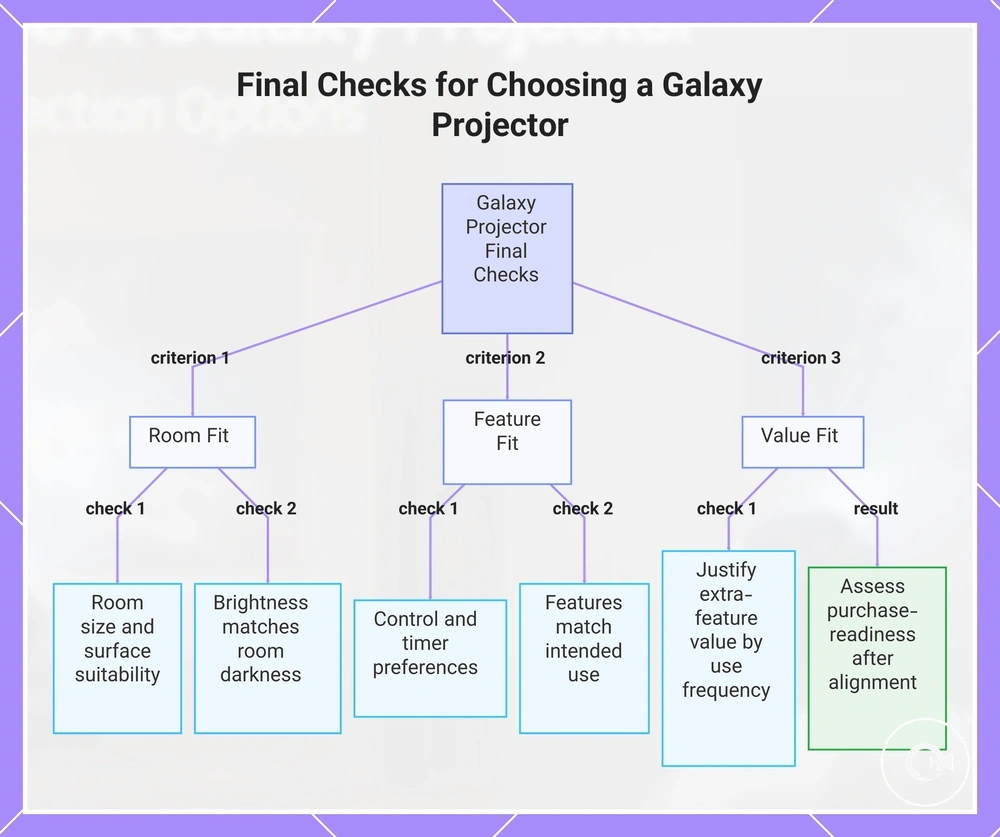
Final checks should confirm room fit, feature fit, and value fit before making a decision. A galaxy projector is more likely to match expectations when room conditions, daily use, and feature priorities have been verified. Final Checks Before Choosing a Galaxy Projector uses the checklist below to confirm the main selection criteria.
- Confirm that the room size suits the intended projection coverage.
- Check whether the projection surface supports the expected viewing effect.
- Verify that the brightness needs match the room darkness and intended atmosphere.
- Choose a control preference that fits how often settings may be adjusted.
- Decide whether a timer need matters for the intended daily use.
- Match the projector features to the intended use, such as sleep, ambience, decoration, or party lighting.
- Confirm that any extra-feature value is justified by likely use frequency.
- Assess purchase-readiness only after room fit, feature fit, and value fit align with your priorities.
If these final checks align with your priorities, the selection can be made with greater confidence without relying on feature count alone. Any remaining trade-offs should be easier to evaluate because the main room, feature, and value conditions have already been confirmed.
The products below are useful examples for comparing available options. Before buying, check that the compatibility criteria, key features, and product details match your needs.
This chart shows the three main criteria for final verification before selecting a galaxy projector: room fit, feature fit, and value fit, along with specific checks under each.